Imagine walking into a world-class restaurant kitchen. You see chefs (the CPU) working at lightning speed, but what makes it all possible is the counter space and the pantry (Memory). If the pantry is messy or the counter is too small, even the fastest chef can’t serve a meal.
In programming, Memory Management is that pantry. Understanding how Python stores data and cleans up its messes isn’t just for curiosity; it’s the difference between a high-performance application and one that crashes under pressure.
1. Memory Allocation: The Pantry Shelves
Every piece of data in Python is an object. This means even a simple integer like 42 carries extra “baggage” (metadata like type information and reference counts).
The Intuition
Fixed-Size Shelves: Native types like
intandfloathave a predictable base size.Dynamic Containers: Types like
listanddictgrow and shrink, often allocating more space than they currently need to avoid constant resizing.
Let’s visualize the memory footprint of different data types.
import sys
import matplotlib.pyplot as plt
import numpy as np

# Use the Gold Standard style
plt.style.use('seaborn-v0_8-muted')

types = {
    'Integer (0)': sys.getsizeof(0),
    'Integer (10^18)': sys.getsizeof(10**18),
    'Float': sys.getsizeof(3.14),
    'Complex': sys.getsizeof(3 + 4j),
    'Empty String': sys.getsizeof(""),
    'Short String': sys.getsizeof("Hello"),
    'Empty List': sys.getsizeof([]),
    'Empty Dict': sys.getsizeof({})
}

plt.figure(figsize=(12, 6))
colors = plt.cm.viridis(np.linspace(0, 0.8, len(types)))
bars = plt.bar(types.keys(), types.values(), color=colors)

plt.title('Memory Overhead of Python Native Objects', fontsize=16, fontweight='bold', pad=20)
plt.ylabel('Size in Bytes', fontsize=12)
plt.xticks(rotation=45, ha='right')

# Annotations to call out critical insights
for bar in bars:
    yval = bar.get_height()
    plt.text(bar.get_x() + bar.get_width()/2, yval + 1, f'{yval}B', ha='center', va='bottom', fontweight='bold')

plt.annotate('Metadata Overhead\n(Type info + Ref count)', xy=(0, 28), xytext=(1.5, 50),
             arrowprops=dict(facecolor='black', arrowstyle='->'), fontsize=10)

plt.tight_layout()
plt.show()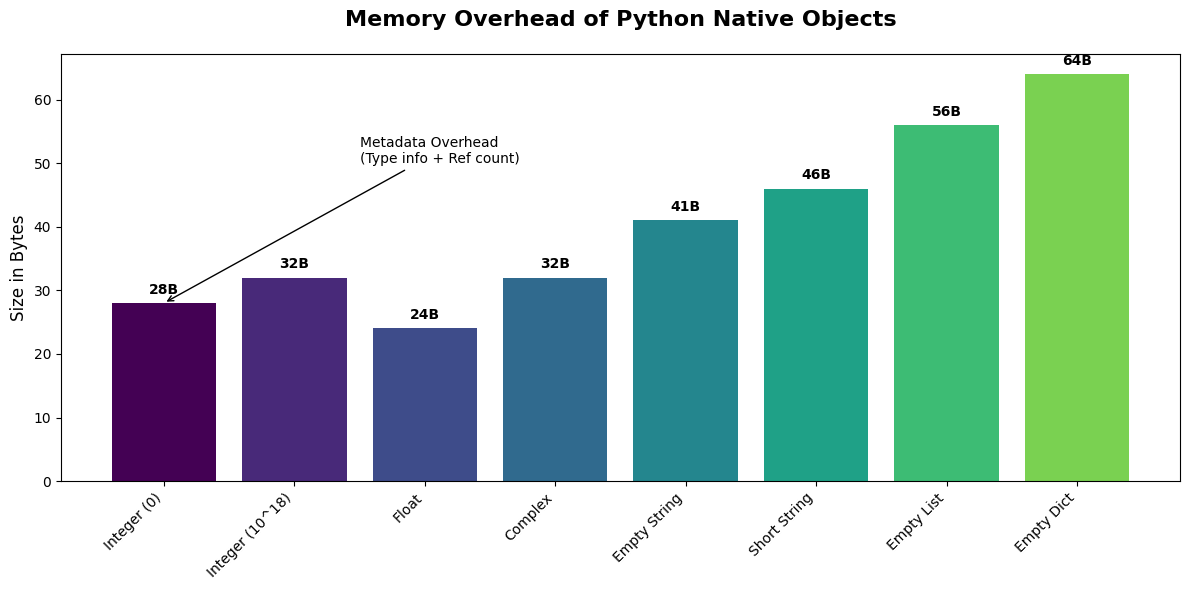
2. Immutability vs. Mutability: Sealed Boxes vs. Shopping Carts
In Python, some objects are Immutable (cannot be changed after creation) while others are Mutable (can be modified in-place).
| Property | Immutable (Strings, Tuples, Ints) | Mutable (Lists, Dicts, Sets) |
|---|---|---|
| Real-world Analogy | A sealed box with a label. | A shopping cart. |
| Behavior | To “change” it, you must create a new box. | You can add or remove items easily. |
| Memory | Safer, can be shared/cached (interning). | More efficient for frequent changes. |
Investigating Object Identity
We can use the id() function to see where an object lives in memory. If the id() changes after an operation, a new object was created.
print("--- IMMUTABLE (String) ---")
s = "Python"
old_id = id(s)
print(f"Initial: '{s}' at {old_id}")
s += " is fast"
new_id = id(s)
print(f"Modified: '{s}' at {new_id}")
print(f"Same object? {old_id == new_id}")

print("\n--- MUTABLE (List) ---")
l = [1, 2, 3]
old_id = id(l)
print(f"Initial: {l} at {old_id}")
l.append(4)
new_id = id(l)
print(f"Modified: {l} at {new_id}")
print(f"Same object? {old_id == new_id}")
--- IMMUTABLE (String) ---
Initial: 'Python' at 1755962622240
Modified: 'Python is fast' at 1756501826736
Same object? False
--- MUTABLE (List) ---
Initial: [1, 2, 3] at 1756502391808
Modified: [1, 2, 3, 4] at 1756502391808
Same object? True
3. Under the Hood of Hash Maps: The Locker Room
Python’s dictionaries are implemented as Hash Maps. Think of a locker room where every player has a unique name (the Key). A machine (the Hash Function) tells you exactly which locker number corresponds to that name.
Load Factors & Collisions
Load Factor: The ratio of occupied slots to total slots. Python tries to keep this below 2/3.
Collision: When two different keys want the same locker. Python uses Open Addressing (searching for the next available slot) to resolve this.
As the load factor increases, the chance of collisions goes up, which can turn our search into something slower. Let’s simulate this.
import time

def simulate_dict_lookups(size):
    d = {i: f"val{i}" for i in range(size)}
    keys_to_lookup = np.random.randint(0, size, 1000)

    start = time.perf_counter_ns()
    for k in keys_to_lookup:
        _ = d[k]
    return (time.perf_counter_ns() - start) / 1000  # Average nanoseconds

sizes = np.logspace(2, 6, 20, dtype=int)
lookup_times = [simulate_dict_lookups(s) for s in sizes]

fig, (ax1, ax2) = plt.subplots(1, 2, figsize=(15, 6))

# Big Picture view
ax1.plot(sizes, lookup_times, marker='o', color='crimson', lw=2)
ax1.set_xscale('log')
ax1.set_title('Big Picture: Lookup Performance', fontsize=14, fontweight='bold')
ax1.set_xlabel('Dictionary Size (n)', fontsize=12)
ax1.set_ylabel('Avg Lookup Time (ns)', fontsize=12)
ax1.grid(True, alpha=0.3)
ax1.annotate('Constant Time $O(1)$ regardless of size', xy=(10**4, np.mean(lookup_times)),
             xytext=(10**3, np.max(lookup_times)*0.8),
             arrowprops=dict(facecolor='black', shrink=0.05), fontsize=10)

# Zoomed-in view (Variability at smaller scales)
ax2.plot(sizes[:10], lookup_times[:10], marker='s', color='navy', ls='--')
ax2.set_title('Zoomed-In: Minor Jitter due to Collisions', fontsize=14, fontweight='bold')
ax2.set_xlabel('Dictionary Size (n)', fontsize=12)
ax2.grid(True, alpha=0.3)

plt.suptitle('Dict Lookup Efficiency: Theory vs. Reality', fontsize=18, fontweight='bold')
plt.tight_layout(rect=[0, 0.03, 1, 0.95])
plt.show()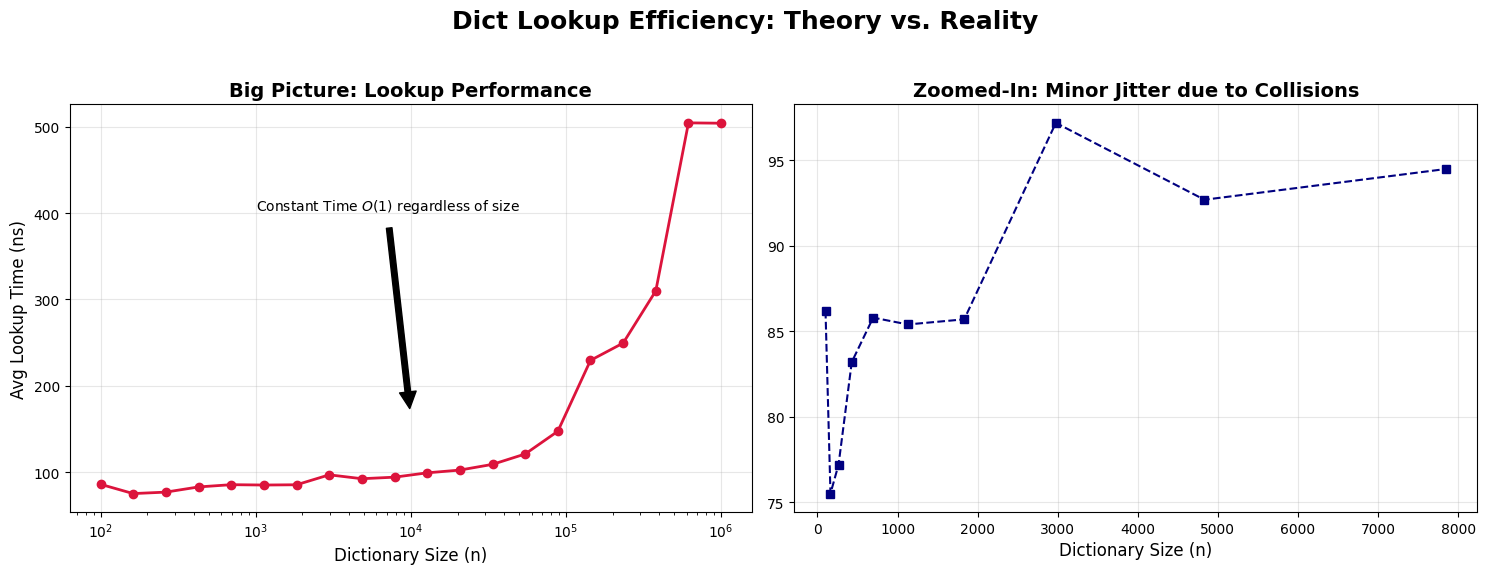
4. Garbage Collection: The Automatic Cleaning Crew
How does Python know when to delete an object? It uses two main strategies:
Reference Counting: Every object keeps track of how many pointers are looking at it. When that count hits zero, the object is deleted immediately.
Generational Garbage Collection: Handles “circular references” (A points to B, B points to A, but no one else points to them).
Monitoring References
import gc

class MyObject:
    def __del__(self):
        print("\bObject is being destroyed!")

print("Creating object...")
obj = MyObject()
print(f"Reference count: {sys.getrefcount(obj)}") # getrefcount itself adds 1 temp reference

print("\nCreating a second reference...")
alias = obj
print(f"Reference count: {sys.getrefcount(obj)}")

print("\nRemoving references...")
del obj
print("One reference remains.")
del alias
print("Last reference removed.")
Creating object...
Reference count: 2
Creating a second reference...
Reference count: 3
Removing references...
One reference remains.
Object is being destroyed!
Last reference removed.
Chapter 2 Cheat Sheet
Complexity of Dictionary Operations
| Operation | Average Case | Worst Case (Many Collisions) |
|---|---|---|
| Get/Set Item | ||
| Delete Item | ||
| Iteration | ||
| Key Membership |
Memory Safety Shortcuts
Small Integer Caching: Python pre-caches integers from
-5to256for performance. Comparing them withiswill returnTrue.String Interning: Short strings are often cached. Always use
==for value comparison, andisfor identity comparison.Slot Optimization: Use
__slots__in custom classes to prevent the creation of a__dict__for every instance, saving significant memory.